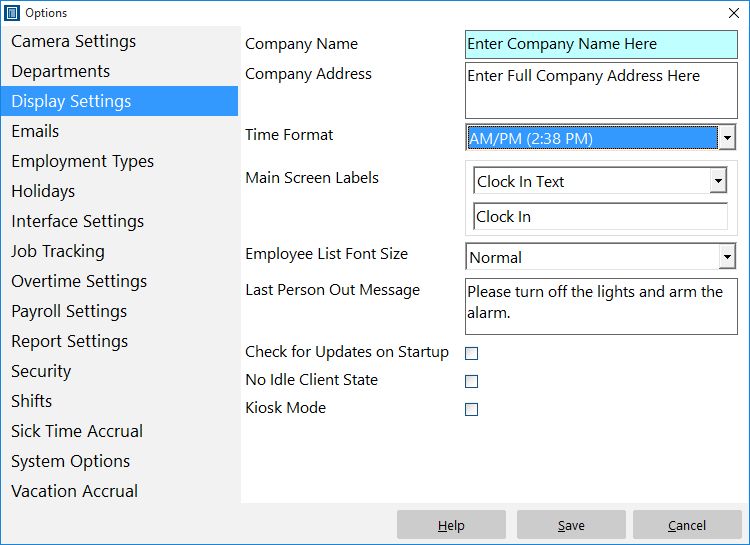
The display settings screen in Time Clock MTS controls how time is displayed and allows you to setup the software with your company information. See the following table for details on the individual settings on this page.
| Company Name | Enter your company name here. This will be displayed at the top of most generated reports. |
| Company Address | Enter your company address here. This will be displayed on reports if you check the Show Company Header checkbox on the report configuration screen. |
| Time Format | Select whether you want time displayed and reported in AM/PM time format or 24 hour (military) time format. |
| Main Screen Labels | You can change the text of any of the labels on the employee list interface of Time Clock MTS. This can be useful if you need to translate the interface to another language to suit your employees. |
| Employee List Font Size | You can change the size of the font of the text on the employee list interface by making a selection from this drop down. |
| Last Person Out Message | Enter a message here to be displayed to the last person that punches out. Could be used to remind employees to turn off lights, arm alarms, or similar. |
| Check For Updates on Startup | Check this box to allow Time Clock MTS to check if there is a new version available on startup of the software. |
| No Idle Client State | Check this box and Time Clock MTS Clients will continually update employee status on the Employee List rather than going idle after 60 seconds. |
| Kiosk Mode | When checked this forces the software to operate in Kiosk Mode. Kiosk Mode is in operation ONLY when the administrator is NOT logged in. It forces the main window to the full size of your monitor and disables to ability to resize or move the application window. It also prevents access to the Help menu. Note that Kiosk Mode can be turned on (or off) on a Client by Client basis overriding this global setting. |