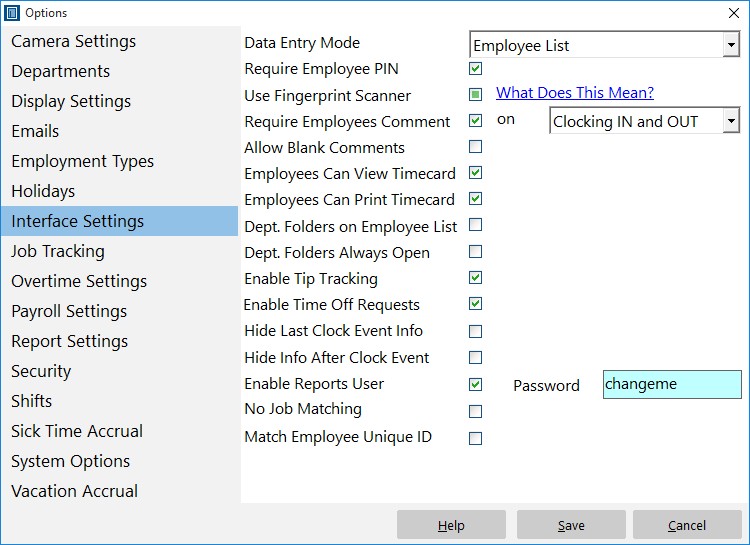
The interface settings of Time Clock MTS allow you to control how employees interact with Time Clock MTS. It can be found via Tools->Options->Interface Settings. See the table below for a detailed description of each setting.
| Data Entry Mode | This controls how you want employees to use Time Clock MTS. Select the Employee List option to have employees pick their name from a list. Select the keypad option to have them enter their badge number. |
| Require Employee PIN | Check this box to require employees to enter their PIN upon clocking in and out. Note that you cannot have this setting turned on while the 'Use Fingerprint Scanner' setting is enabled. |
| Use Fingerprint Scanner | If you have a Digital Persona fingerprint scanner you can check this box to require employees to scan their fingerprints on clock in and out. Note that you cannot have this setting turned on while the 'Require Employee PIN' setting is enabled. |
| Require Employees Comment | Require employees to enter a comment. |
| Ask For Comment On | Select when you want employees to enter a comment. You can require employees to enter a comment on clocking in, clocking out, or clocking in AND out. Note that you must check the Require Employees Comment checkbox for this setting to take effect. | Allow Blank Comment | Check this box to allow employees to enter a blank comment. |
| Employees Can View Timecard | Check this box to allow employees to view their punchcard or job punchcard reports. |
| Employees Can Print Timecard | Check this box to allow employees to print their punchcard reports. |
| Dept. Folders on Employee List | Check this box to split up the employees by department when using the employee list interface. |
| Dept. Folders Always Open | Check this box to stop users collapsing department folders. This only takes effect if you've checked the Dept. Folders on Employee List checkbox. |
| Enable Tip Tracking | Check this box to turn on Employee Tip Tracking. |
| Enable Time Off Requests | Check this box to turn on Employee Time Off Requests. |
| Hide Last Clock Event Info | Check this to stop Time Clock MTS from displaying the last clock event of a selected employee when using the Employee List interface. |
| Hide Info After Clock Event | Check this to hide employee event information 5 seconds after an employee clocks in or out. This setting is fairly pointless if you do not use the Hide Last Clock Event Info setting too. |
| Enable Reports User | Check this box to enable a reports user login for the Time Clock MTS administrator and client programs. The reports user can login via the File->Log in as Reports User menu item. The reports user (when logged in) can run any of the Time Clock MTS reports. Note that you must enter a password for the reports user to function. |
| Reports User Password | The password that needs to be entered by the reports user when logging in. The reports user password must be between 6 and 10 characters long and can only include letters, numbers, and the _ (underscore) character. |
| No Job Matching | Check this and Time Clock MTS will not attempt to auto-match a job to an entered job number when an employee is clocking in or switching jobs. Can speed up load time when the job number list is very large. However it does increase the likelihood that employees will enter non-existent job numbers when clocking or switching jobs resulting in more failed clock-ins / job switches. |
| Match Employee Unique ID | Check this box to have employees matched on their Unique ID on the Employee List Interface. So, if an employee has their Unique ID set to 123456 typing 123456 or scanning 123456 via a bar code scanner or magnetic card reader will match that employee automatically and try to punch them in or out. |