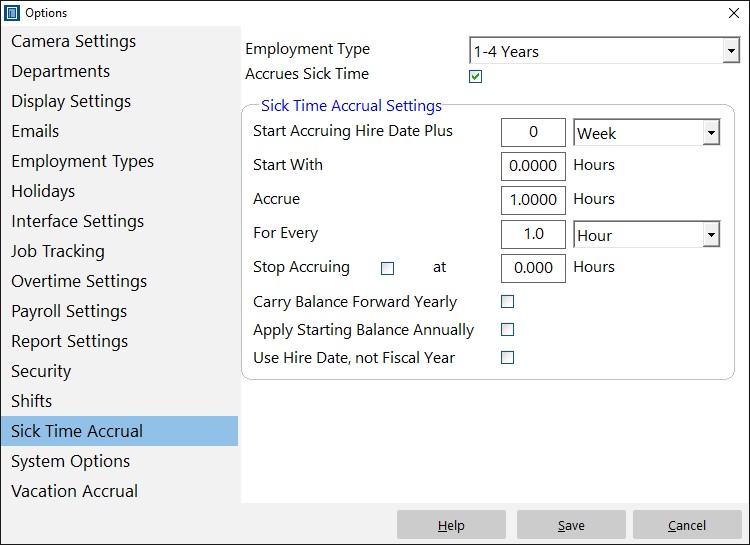
The Sick Time Accrual page is where you can define the sick time accrual for each employee type (if any). It can be found via Tools->Options->Sick Time Accrual.
| Employment Type | Select the employment type you want to change the sick time accrual settings for. |
| Accrues Sick Time | Check this box if the selected employment type accrues sick time. |
| Start Accruing Hire Date Plus | The number of weeks/month after hire date that the employment type starts accruing sick time. |
| Start With | Enter the number of hours you want this employment type to start with (usually zero) when accrual starts. | Accrue | Enter the number of hours you want to accrue per time unit (see next setting). For example, an employee entitled to 10 hours of annual sick time would accrue 0.8333 hours per month or 0.1923 hours per week. |
| For Every | Enter the time unit you want to accrue sick time for. Time Clock MTS uses whole time units to calculate accruals, so if the time unit is a month then an entire month will need to elapse before an accrual occurs. |
| Stop Accruing | Check this box to set an upper accrual limit for sick time and then enter the value into the text box. |
| Carry Balance Forward Yearly | If this box is checked then sick time accrual will carry forward each year. If it is not checked then the sick time accrual will be reset at the start of the fiscal (or hire date) year. |
| Apply Starting Balance Annually | If this box is checked then the accrual "Starts With" balance will be applied at the start of each year (fiscal or hire date anniversary depending on Use Hire Date setting). Note that this setting will only take effect if the Carry Balance Forward Yearly setting is NOT set. |
| Use Hire Date, Not Fiscal Year | If this option is checked then the anniversary of employee hire date is used as a basis for sick time accrual calculations rather than the fiscal year. |