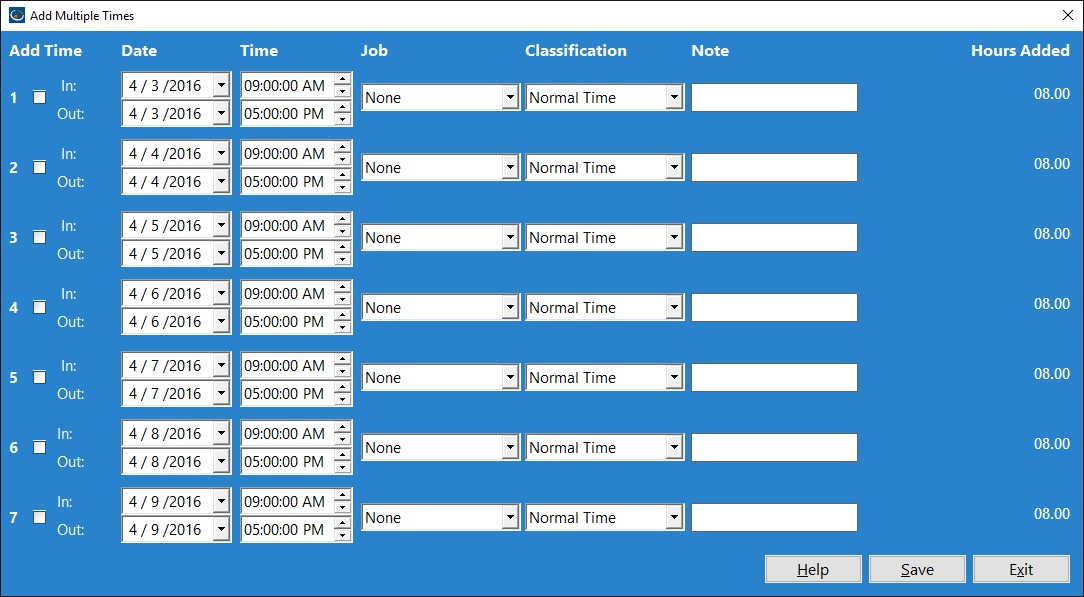
You can add up to 7 time punch pairs from the Manage Employee Time Punches screen. The Add Multiple Time Punches screen allows you to adjust the time and date of the times, classify the time (normal, vacation, sick time, or other) as well as add a note to the time as you create it. Note:If an employee is clocked in while you're trying to add times, those times must be at least 24 hours after the employee's current clock in time.
Adding a Time Punch
To add a time, check the check box next to it. If the check box is not checked the time will not be added when you click the Save Times button.
Setting Date / Times
Use the date select boxes to set the dates of the Clock in and Clock out times. Use the Time select boxes to set the times of the Clock in and Clock out times.
Classification
Set the type of time here, whether it is normal time, sick time, vacation time, or other.
Adding a Note
You can add a note to your newly created times by entering some text in the Note field.
Hours Added
The hours added text label shows you how many hours your selected Clock in and Clock out times span. If there is a problem with a time you are trying to add then it will be displayed here.