by kathryn@timeclockmts.com | Oct 27, 2012 | New Features, New Releases
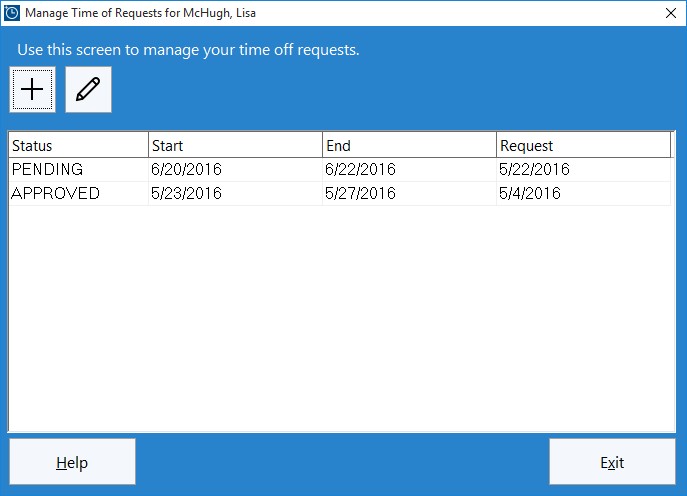
Employees use this screen to manage their own time off requests.
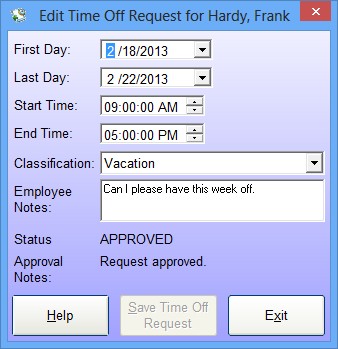
One of the major new features in Time Clock MTS Version 4 is the ability for employees to be able to request time off directly from your employee timeclock system. These requests can then be processed by the time clock administrator to automatically create time card entries of the correct type for the employee. The time off request system is integrated with the Employee Bulletin System so that employees will be automatically notified of the leave request approval status.
by kathryn@timeclockmts.com | Oct 26, 2012 | News

Well, as they say, “resistance is futile”! We’ve given in and finally created a Facebook page for Time Clock MTS. This page will cover all our other products and may also include interesting tips and tricks that we come up with over time. So, if you’re a happy Time Clock MTS user why not head on over and like our shiny new Facebook page! Feel free to post on it and ask any questions you might have too!
by kathryn@timeclockmts.com | Oct 22, 2012 | New Features, New Releases
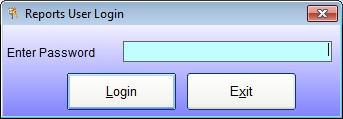
The Reports User Login Screen
Over the last year or two a lot of Time Clock MTS users have asked for some more flexibility with regards to who can and cannot run Time Clock MTS reports. We’re happy to say that Time Clock MTS version 4 is going to include a “reports user” (see the login screen above). The reports user will be able to log into any Time Clock MTS Client or the Time Clock MTS administrator program and run any employee timecard report. If they log into the Time Clock MTS administrator program they can only run reports, they will not have access to any other administrative functions. The Time Clock MTS administrator will be able to turn the reports user functionality on or off and set the password for this user on the re-designed Interface Settings screen.
by kathryn@timeclockmts.com | Oct 22, 2012 | New Features, New Releases
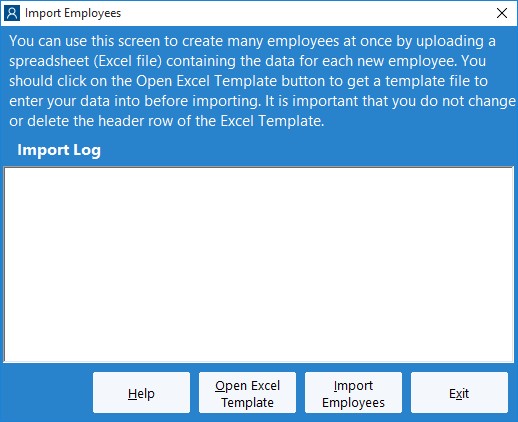
The Import Employees Screen
One of the interesting new features in Time Clock MTS Version 4 is the ability to do a bulk import of employees from an Excel spreadsheet. Above you can see what the import employee screen is going to look like. Creating a spreadsheet for importing is going to be simple. Users can click on the Open XLS Template button on the screen above which will open up Excel with a template worksheet including all column headers and helper text showing how to fill in column values. Alternatively we’ve also included the ability to export all the employees in your Time Clock MTS database to Excel. This file could then be used as a basis to import a new batch of employees into your timeclock software system
by kathryn@timeclockmts.com | Oct 11, 2012 | News
There’s a couple of news items for today. Firstly, we’ve just posted up a nice new testimonial over on the Time Clock Software User Reviews page. Secondly, we’ve been compiling a list of features, enhancements, and fixes to be included in Version 4 of Time Clock MTS. We’re getting pretty close to finalizing this and starting development of this major release. The release is expected in the next 4 weeks or so. Stay tuned for more news about this release here as I’ll try to add more information as work progresses on the release.
