by kathryn@timeclockmts.com | Nov 23, 2011 | New Releases
Version 3.2.8 of Time Clock MTS is being uploaded as I write this entry. This new release now includes the current job number on the Employee Status Report. It also fixes up an error that was thrown on various maintenance pages on the Options screen (namely the Departments, Employment Types, Holidays, Shifts and Jobs pages) when the Edit button was pressed immediately after adding a new item to the list. Thanks to the long time Time Clock MTS user who was able to put me on the right track to fix up these errors which I’d been trying to track down for quite a while!
View all release notes of all Version 3 changes here.
by kathryn@timeclockmts.com | Nov 18, 2011 | User Testimonials
You may or may not know that we’ve got a time clock user reviews page that we use to put up nice emails or comments about the software we get from happy Time Clock MTS users. We put these emails up exactly as we receive them. We got a couple of good ones this week including one (completely spontaneous) email from the operations supervisor of a very large agricultural resources company. We’ve been working with this gentleman quite closely for several months ironing out usage problems he had with the software as well as adding some reports that he wanted to see. Clearly he’s happy with the result.
by Mark Nemtsas | Nov 18, 2011 | Tips and Tricks
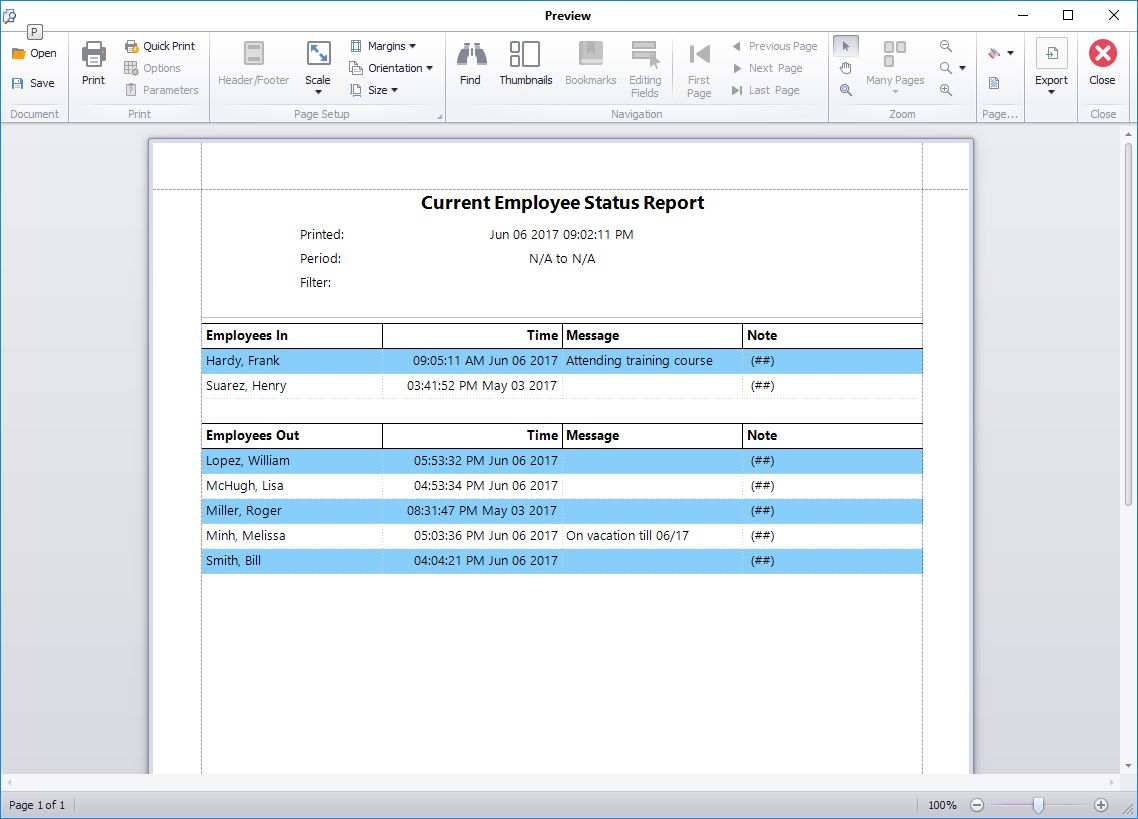
This report shows who of your employees is punched in and out.
Businesses have been finding ways for their employees to clock in and out for many years. From ID cards to finger prints, there are a huge range of options for small and large companies looking to get a device or some sort of software to keep a record of who is working and who is not. In/Out boards are an example of this type of device, and they are used in the work place for a whole variety of reasons.
1). An In/Out board provides easily accessible information about other employees. The contact details and working hours of employees are available to view, and this allows the business to operate in a much more smooth manner. The business can provide their customers with the contact details of employees and people that they may need to get in touch with about a certain aspect of the company.
2). It allows employers and other employees to know exactly who is inside the building in the case of an emergency. The In/Out board will quickly show the names of employees who are still on the premises, which means that other members of staff can alert everybody of the emergency and ensure that each person is safe.
While In/Out boards are very useful and are popular with large and small businesses, it does not change the fact that employees do not always find them easy to use. Physically manipulating the board can be extremely time consuming, and employees often cannot be bothered to use up so much time, especially if they have entered the building through another entrance where the In/Out board is nowhere to be seen. Employees will usually contact somebody else within the building, for example, the receptionist, who will change the board; however, even this can take up a lot of time if there are other tasks that the receptionist must complete.
Time clock software, on the other hand, is very easy for all employees to use when clocking in and out. Most businesses have stated that they find calculating payroll, sick pay and other figures very time-consuming. Software time clock systems will do all the calculations for you, so you can save time and do something else rather than spend several hours working out figures. Using the Employee List in Time Clock MTS is like using an electronic in/out board. An easy to read status icon appears next to each employee’s name showing clearly whether they are punched in or out. Additionally a message can be shown next to an employee giving more detail about where they are or how to contact them. Is someone working off site? Then make a note of it. Is someone on your shop floor and can only be reached by their cell phone? Make a note of that too.
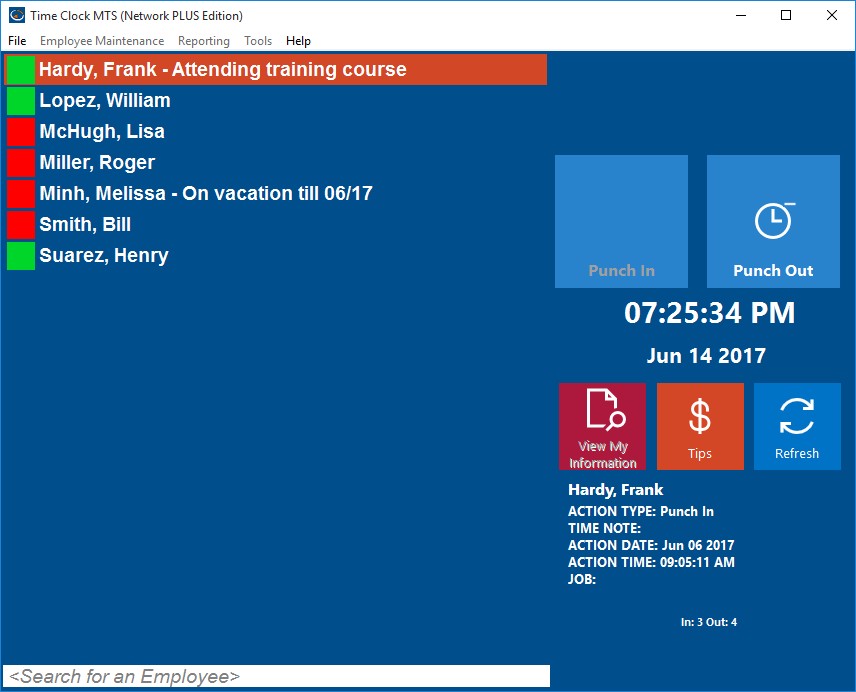
See Easily Who is In or Out plus where they are!
Time clock software like Time Clock MTS often provide you with support from forums and the product’s website. Time Clock MTS is updated regularly to give you ease of use and to ensure that nothing is outdated, giving you the best experience using a time clock system. Only authorized PCs can use the software, so you don’t have to worry about unauthorized sources accessing private information.
Time Clock MTS is a computerized time clock system that allows any number of employees to clock in and out with ease. The Employee Status Report is a feature of Time Clock MTS and is used by employers to see who has and who has not been in work over a certain period of time. You can view all the employees who are clocked in at a certain time and all the employees who are clocked out. You can also view the most recent employee notes that have been added to the system.
As well as being used by businesses for many other things, Time Clock MTS can be very useful and effective as an In/Out board.
by kathryn@timeclockmts.com | Nov 8, 2011 | New Releases, News
A very minor release today that fixes up a couple of minor glitches with the biometric features of the software and adds some data logging to the fingerprint initialization process to allow us to track down the source of any problems. The complete list of changes is below.
- A fix to a spelling error on the fingerprint driver installation screen.
- You can no longer enrol fingerprints if no employee is defined.
- Added data logging to the fingerprint enrolment screen.
- Completely re-built the fingerprint_update.exe installer to be compatible with 64 bit versions of Windows. The installer now detects if the operating system is 64 bit or 32 bit and installs the correct driver set.
