
California Overtime Clarifications
A while back I wrote about setting up Time Clock MTS to comply with California overtime legislation. An interesting question has come up from a user this week that is worth looking into further. The question relates directly to California Labor Code Section 500-558 (which you can see here). In particular it relates to this text:
Any work in excess of eight hours in one workday and any work in excess of 40 hours in any one workweek and the first eight hours worked on the seventh day of work in any one workweek shall be compensated at the rate of no less than one and one-half times the regular rate of pay for an employee.
It is easy to assume on reading this that all hours worked during a week are used in calculating hours in excess of 40 being worked. However, this is not the case as is illustrated by this memorandum from the Californian Department of Industrial Relations. The section of particular interest in this memorandum is this:
The statute also provides that “nothing in this section requires an employer to combine more than one rate of overtime compensation in order to calculate the amount to be paid to an employee for any hour of overtime work.” This is consistent with DLSE’s enforcement of the pre-1998 wage orders. It simply means that there is no “pyramiding” of separate forms of overtime pay for the same hours worked. Once an hour is counted as an overtime hour under some form of overtime, it cannot be counted as an hour worked for the purpose of another form of overtime. When an employee works ten hours in one day, the two daily overtime hours cannot also be counted as hours worked for the purpose of weekly overtime.
The basic upshot of this is that once an hour has been used towards calculating daily overtime it cannot be used to calculate weekly overtime. In practical usage this means that only Normal rate hours are used to calculate overtime due to exceeding the weekly work limit of 40 hours.
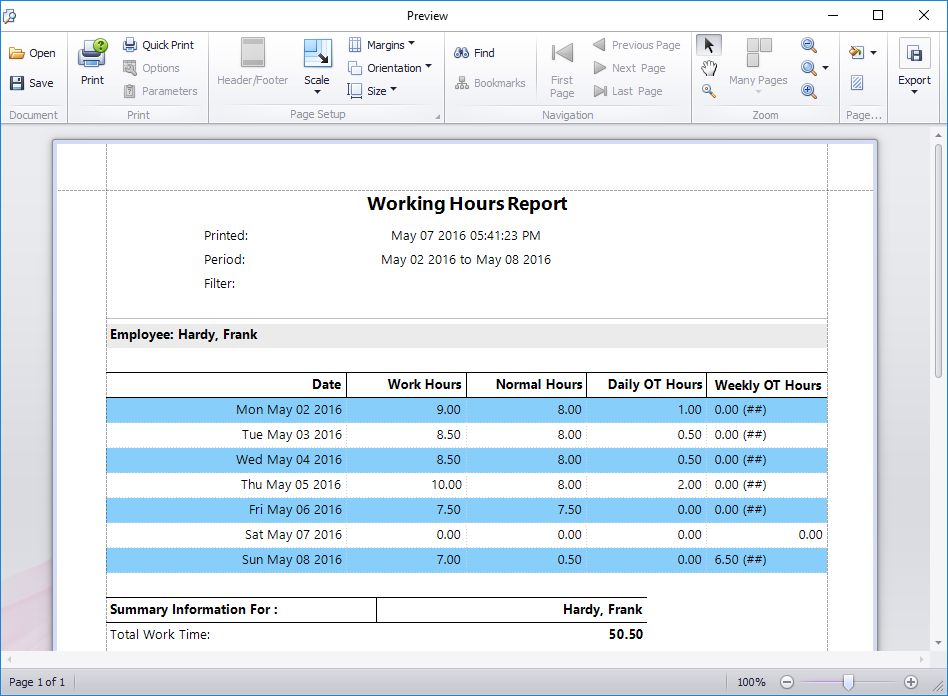
Above you can see how Time Clock MTS handles this situation. In this example the employee actually exceeds 40 hours worked on Friday May 6th but 4 hours have already been counted towards daily overtime and thus cannot be used to calculate the weekly overtime limit. In fact, the employee exceeds 40 normal hours worked after half an hours work on Sunday May 8th and the remainder of work on that day (6.5 hours) is counted as weekly overtime.
I hope this example explains how Time Clock MTS handles overtime calculations when configured to suit California Overtime Regulations.