by kathryn@timeclockmts.com | Jan 17, 2011 | Using the Software
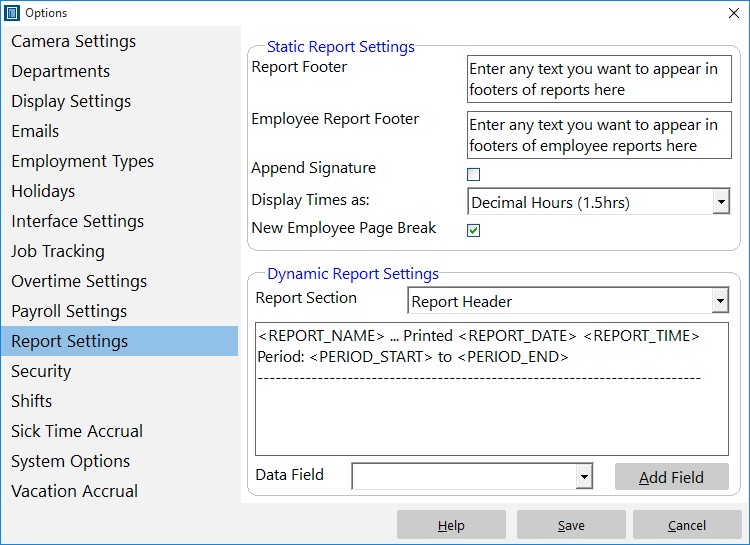
Control how reports are formatted to suit your requirements.
A couple of times this year I’ve had questions from Time Clock MTS users who thought that the actual hours worked for salaried employees was reported incorrectly on various Time Clock MTS reports. The mis-understanding arises because of two factors:
1) Time Clock MTS allows you to track the clock in and out times of salaried employees BUT….
2) Time Clock MTS calculates the actual work hours of salaried employees on a pro-rated basis of elapsed calendar weeks or months across a report period.
In a nut shell this means if you’ve got a salaried employee whose salary period is weekly, you’ve got your work week set to 40 hours, and you run a report for two weeks then the reported work hours for that salaried employee will be 80 hours. Regardless of the hours actually worked by the employee.
You can see the actual hours worked by a salaried employee by editing the Employee Summary and Payroll Summary section templates on the Report Settings screen. Edit these templates to include the data field along with a descriptive label and you’ll be able to see the actual hours worked by your salaried employees during the reporting period.
by kathryn@timeclockmts.com | Jan 13, 2011 | New Releases, News
I released a new version of Time Clock MTS today that included a fix for vacation and sick time accruals that carried the balance forward yearly AND had an accrual limit set. Basically the maximum accrual limit was being tested AFTER deductions for sick or vacation time were being applied. This meant that in some cases the available sick/vacation balance would be wrong. This has now been fixed up. Thanks must go to the Time Clock MTS user who was trying to setup a particular Yearly Vacation Accrual Scheme that highlighted this problem.
by Mark Nemtsas | Jan 11, 2011 | Tips and Tricks, Using the Software
A fairly common question I get from prospective users is whether purchasing Time Clock MTS is a one time thing or is a yearly renewal required? Here’s the answer:
- When you buy Time Clock MTS you get a lifetime license to use that version of the software, it entitles you to one year of email support and software updates.
- Once a year has elapsed since the purchase of Time Clock MTS you’ll receive an email allowing you to renew your email support and software update contract for a further year. The cost of this is $25 (US) for the Stand Alone Version, $50 (US) for the Network Version, and $100 (US) for the Network PLUS Version. Of course you don’t have to renew but you wont be eligible for support nor will you be able to receive updates to the software that might include new features or bug fixes.
That’s all there is to it. There’s no need to renew your support every year if you don’t want to, Time Clock MTS is very reliable and has enough flexibility to support most businesses right now. However, some companies like the surety of email support and the chance to access new features and bug fixes as they become available.
by kathryn@timeclockmts.com | Jan 9, 2011 | New Releases, News
I’ve just finished uploading the first release of Time Clock MTS for the year. It includes a couple of minor fixes, tweaks to reports, and added a new report. The details of the changes are shown below.
- Total rows have been added to the Simple Wages Report and Time Breakdown Report. This is one of the first examples of cross pollination of ideas between our Web Time Clock system, Online Time Clock MTS and the desktop program Time Clock MTS. A user of the online system suggested the change to similar reports there and I’ve made the same change to the desktop product.
- A new report, the Detailed Punchcard with Full Notes Report has been added. This is the same as the regular Detailed Punchcard Report but shows the full text from all time notes rather than just the first 60 characters.
- The mouse cursor now turns to an hour glass when exporting reports to MS Excel to give an indication that something is happening.
- A fix has been put in place to stop Excel throwing an error when the new window is clicked while a report export process is underway.
by Mark Nemtsas | Jan 7, 2011 | News
At the end of the first week of 2011 it’s probably about time I spent a few minutes looking back at 2010 and what’s happened with Time Clock MTS during the year. We averaged one new release of Time Clock MTS a month during the year, as always concentrating on fixing up problems as they are found by Time Clock MTS users and adding features that are the most commonly requested. The biggest release of the year was in October with Version 3 being unleashed and containing a lot of new tweaks and enhancements to make the software easier to use while being more flexible to suit more and more businesses.
The number of companies using Time Clock MTS continued to grow during 2010 with the total number of companies growing by around 25% in total and now numbering several thousand. We’re still seeing some effects of the GFC on our sales with 2010 being pretty flat compared with 2009. This is particularly apparent in our sales in the United States but 2011 has started off very well and perhaps there’s a new air of confidence in business circles. Let’s hope so for all our sakes, I think the lingering effects of the GFC should be put behind us and the time to move forward has come.
2011 promises to be an interesting year, we have many plans for Time Clock MTS as well as the on-going development of Online Time Clock MTS. The goal is to mirror the functionality of Time Clock MTS in the online version and to provide a good level of data interchangeability. The first step in this will allow people to move seamlessly from one version to the other. The longer term goal is to allow the two systems to operate together, so you could allow your employees to clock in and out via a web interface while running reports and configuring the software from the desktop admin software.
I’ll draw this entry to a close here. I hope you all had a very Merry Christmas and wish you all a fruitful and happy New Year!
