by Mark Nemtsas | May 28, 2010 | News
I’m happy to announce that Online Time Clock MTS is now available for testing during a completely free BETA test period. This will allow you to use Online Time Clock MTS completely free of charge while we develop and test it prior to it going completely commercial in a few months. We’ve tried to bring the same user friendly interface and features that you, the Time Clock MTS user have helped us develop over the years to the online version of Time Clock MTS.
Time Clock MTS and Online Time Clock MTS are not compatible at the moment, but the plan is that we’ll develop a data export tool to allow you to send your Time Clock MTS data to the online version. Once that happens you’ll be able to transition to Online Time Clock MTS and use that instead of Time Clock MTS (you won’t be able to use both at the same time with the same data).
If you’re interested in learning more about the new online application then head on over and read about Online Time Clock MTS or just dive straight in and sign up for a free online time clock account and start using it.
by Mark Nemtsas | May 12, 2010 | News
We’re lucky enough to have had Time Clock MTS reviewed a few times by independent reviewers on various sites around the internet. I wouldn’t say that any of these reviews has been fully comprehensive (it’s hard to test out the full capabilities of Time Clock MTS in a short period) but these time clock reviews are useful if you’re considering the purchase of a time clock program. Here’s a list of the time clock reviews including Time Clock MTS that we’re aware of.
If you’re aware of any more reviews of Time Clock MTS about the place please let me know. If you want to know what real world users have got to say about Time Clock MTS you could take a look at our user reviews page or take a look at a recent blog entry with a user talking about his real world use of Time Clock MTS in a machine shop.
by Mark Nemtsas | May 7, 2010 | Using the Software
Last week I was asked what the key selling point of Time Clock MTS was? I thought for a while before saying the following….”the software is designed primarily to be extremely simple to use for employees ensuring that the quality of time and attendance data collected is as high as possible and the on-going cost of ownership to the company is as low as possible”. Time Clock MTS is in fact, time clock software designed for your employees. Much time has been spent streamlining the process that employees go through to clock in or out of Time Clock MTS and in it’s most simple form they can do so with just two mouse clicks. There’s a little more work if you want your employees to enter a PIN number or password when they clock in or if you want them to use their fingerprint to clock in or out but even then you’re talking about less than 10 seconds work.
In my experience, any software that makes the employee’s task of clock in or out difficult or time consuming will result in one or many of the following happening:
- The failure to of the employees to use the time clock system altogether or only sporadically, meaning employee attendance information will neither be timely or accurate.
- Log jams at the start of shifts as employees queue to clock in or out meaning time is lost on non income generating administrative tasks.
- An on-going and recurring training expense for new hires as they need to be trained in the use of a clunky employee time clock system.
With the time we’ve spent refining and optimizing Time Clock MTS to be the easiest to use employee timeclock software on the market we’ve addressed all of these three points. We’re so confident of this that in most cases companies will pay for their initial purchase of Time Clock MTS within just a couple of months and have a system that allows them to get on with the work that generates their profits. If you’re interested in trying out Time Clock MTS free of charge for 30 days then head over to our download page to download Time Clock MTS.
by Mark Nemtsas | May 7, 2010 | How To, Tips and Tricks, Using the Software
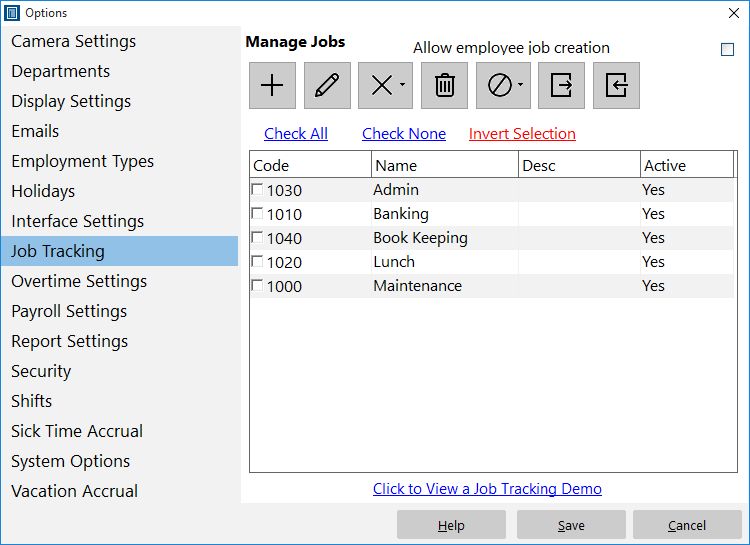
Control and define Time Clock MTS jobs here.
A common question I get asked is “How do I track paid breaks for my employees?”. I’ve never really had a good answer to this question until earlier this week in a flash of inspiration (yes I do have them very occasionally) I realized that anyone could easily make use of the Time Clock MTS Job Tracking features to easily track paid breaks. Here’s how I’d set it up:
- Go to the Job Tracking screen and define a job for each paid break type that you want to track. This might be ‘lunch break’ or ‘coffee break’ or whatever suits your needs.
- Go to the Employee Information screen and set the Job Tracking setting for each employee to “Optional”. When this is set, employees will be shown the “Enter Job Code” screen when they clock in or out but they won’t actually have to enter a code.
- When employees come to work, just have them clock in as normal without entering a job code. When they take a paid break, have them clock out and switch jobs to one of your paid break codes which you defined in step 1 above. When they return from a paid break, have them switch jobs again but not enter a job code (they are back on normal time).
- You can then use Job Time Report to monitor how much time your employees are spending on their paid breaks and ensure there is no time clock fraud occurring.
I hope you find that little tip helpful, it will certainly give employers much tighter monitoring on what their employees are up to with almost no extra administrative overhead being added to the business!
