by kathryn@timeclockmts.com | Aug 17, 2011 | New Releases, News
As I write this entry Time Clock MTS Version 3.2.2 is being uploaded to our web-servers. This minor release includes some fixes to the employee image capturing features of the software, a fix to some MySQL database creation code, and a fix to a problem that a recent Windows update caused in many programs (not just Time Clock MTS). Details of the fixes are below:
- In cases where there was latency in database writes (especially when using SQL Server or MySQL) captured employee images could sometimes become mis-matched with the times they were associated with. This has now been resolved.
- One user was reporting a case where the image capture directory could not be opened to view captured images. I’ve put in some extra logging to try to work out why this is happening.
- An error was thrown by anyone upgrading to V3 of the software if they were using the MySQL backend. This has now been fixed.
- Referenced the backwards compatible ADO type library rather than the ADO 2.5 type library. This is because our main build machine is now a Windows 7 x64 machine with SP1. This problem is documented in this Microsoft KB Article.
With direct reference to the last point this is a failing with Service Pack 1 of Windows 7 rather than anything to do with Time Clock MTS. If you install and run our software and receive the error “Error 430 : Class does not support Automation or does not support expected interface” please get in contact with us as soon as possible so we can get to the bottom of the problem.
by Mark Nemtsas | Aug 7, 2011 | Tips and Tricks, Using the Software
One of the more time consuming areas of employee time and attendance tracking is allowing for and recording the events that are outside of the regular process of employees clocking in and out. These sorts of events include employees forgetting to clock in, forgetting to clock out, forgetting to log their breaks, or an administrator recording sick and vacation times. Computerized time clock software like Time Clock MTS cannot escape the need to deal with these sorts of situations any more than manual timeclocks or paper based timesheets can. Where Time Clock MTS excels is that it provides a streamlined process to enter these exceptions and recalculates your payroll in just seconds. While non computerized systems need tedious manual re-calculation which is not only in-efficient but is also prone to error and mis-calculation.
I thought it was worthwhile examining some of the time clock exceptions that would require you to use Time Clock MTS to correct your employees timesheets.
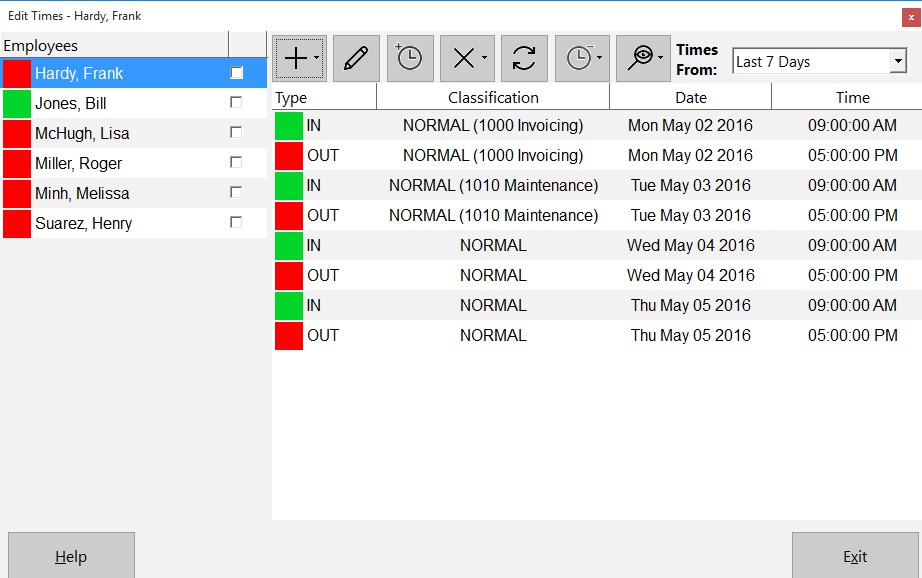
The Edit Times Screen
Missed or Late Time Clock Punches
The most common sort of event that requires an employee’s timesheet to be corrected is the missing punch. This will usually be forgetting to clock in at the start of a work day or forgetting to clock out at the end of a work day. The first step to correcting a missing punch is to actually determine if there are missing punches. This is made very simple through the use of the Missing Punches Report. Alternatively if you’ve got employee comments enabled then employees can leave a note when they clock in late or clock out late. For some other methods of detecting if employees have missed a punch you should take a look at our detecting when an employee forgets to clock in or out blog entry.
There’s a number of ways that Time Clock MTS allows you to handle missing or late punches and all of them involve the Edit Times screen. This screen allows administrators to correct existing employee time card data, insert new punches, and remove existing ones. Adjusting the time for a late clock in or out couldn’t be any simpler. Just double click the time that needs to be edited on the Edit Times screen and change the event time and date to the correct values.
Missed Breaks and Meal Times
Forgetting to clock out and back in when breaks and meal times are taken is a lot more common that anyone realizes and probably the most common timesheet correction after late punches. Because of this Time Clock MTS has made it especially simple for the administrator to clock an employee out for a break and back in using the Edit Times screen. We’ve taken the time to write about this process in some detail in our blog entry about inserting a missing employee punch.
Recording Sick and Vacation Time
Obviously employees cannot use a time clock system to record their own sick and vacation time so Time Clock MTS delivers a streamlined method for administrators to enter several days sick or vacation time for an employee in one simple step. As you’d expecting this happens on the Edit Times screen. Here you can add a single day of sick or vacation time or more efficiently you could add up to 7 days worth of times by making use of the bulk time entry screen. You should be aware that before you can enter sick or vacation time that employee must be set up to record sick time or set up to record vacation time.
Recording Times for Off-Site Staff
There’s no getting around the fact that sometimes staff just are not on site to be able to use your time clock software to record their time and attendance information. In these cases we usually recommend making use of one of our free timesheet templates to manually record the employee’s work times. These times can then be added quickly and easily from the Edit Times screen, again making use of the bulk time entry screen. Alternatively you could convert to our online time clock system www.timeclockmts-online.com. This system allows your employees to punch in and out from any web-browser on any device connected to the internet.
Conclusions
If you’re looking at purchasing a time clock system then you must ensure there is a simple and robust method of correcting your employees timesheets. For reasons of both business efficiency and payroll accuracy correcting employee timesheets is vital to ensure you can deal with forgotten employee punches, late punches, sick and vacation time, and for entering timesheet data for off-site employees.
by Mark Nemtsas | Aug 4, 2011 | News
We’ve just posted up a new page containing 6 timesheet templates that are free to download and use by anyone. These free timesheet templates can be used to record 2 weeks worth of timesheet information for one employee and could then be printed out to give to a supervisor or your payroll department. Alternatively they could be attached to an email and sent that way. Right now we’ve posted up Microsoft Excel Timesheet Templates, Microsoft Word Timesheet Templates, a PDF Timesheet Template, and an Open Document Text Timesheet Template. If you’d like to see any more free timesheet templates in other formats please contact us and let us know.
We hope that these simple timesheet templates will be of some use, but you should be aware that manual timesheets like these are not an ideal time and attendance tracking system for any business. They are inefficient, prone to inaccuracy, and often lead to timesheet fraud. Time Clock MTS is a far superior system that allows any Windows based PC in your company to be used to track your employee’s attendance. It’s simple to use, accurate, and can generate your payroll reports in just a matter of seconds. There’s a free 30 day trial available and for very small businesses (track just 3 employees) it can even be used for free forever!
by Mark Nemtsas | Aug 2, 2011 | News
We’ve just spent time developing a simple, and free timecard calculator that can be used online to record a single weeks time and attendance data. It’s very simple to use, just enter the clock in and out time for each day along with any break time taken. The free time card calculator will take care of the calculations for you automatically giving you a total amount of time in hours and minutes worked for each day along with the total time worked for the week. You can then print the page to give to your payroll department or print the page to PDF for easy emailing. We hope you find this new tool useful and as always we welcome your feedback and comments.
