
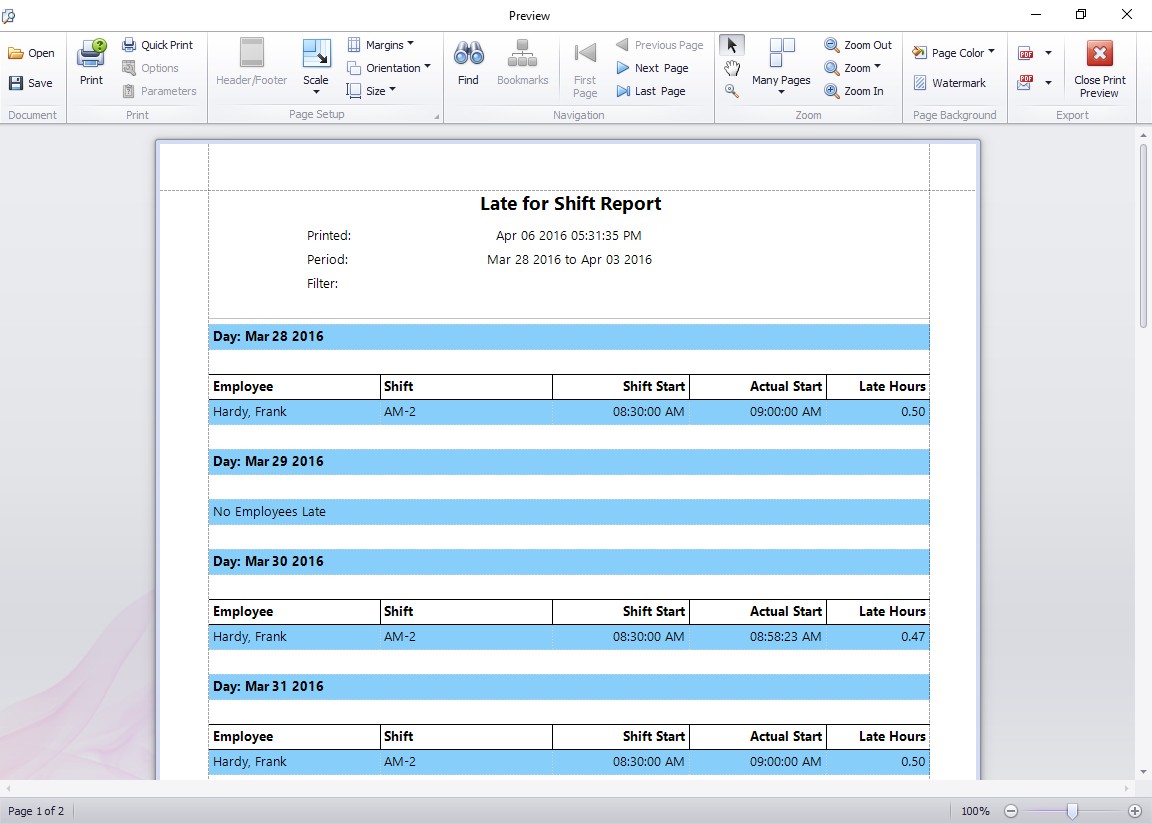
The late for shift report displays all employees that have arrived for work after their designated shift start times.
The recent release of Version 3.1.5 of Time Clock MTS included a new report that allows users to easily run a report displaying employees that have clocked in late for their shift. The output of this report can be seen above. Here’s how to setup Time Clock MTS to allow you to use this report to track when your employees are clocking in late for their shifts.
- For each different shift start time you need to track you’ll need to create a shift on the manage shifts screen in Time Clock MTS. You can do this in Tools -> Options -> Shifts. Read more about Shifts in the online help files. Made sure to set the shift start time to the time that you want to track.
- Assign each employee to the shift that they work. You can do this on the Employee Maintenance -> Edit Employee screen. See Employee Information in the Online Help File.
- Have your employees clock in and out using Time Clock MTS as normal.
- Run the Late for Shift report on the Report Configuration Screen. The report can be run over one or many days, and run for one or many employees.
- You can now interpret the report. It will give you a day by day list of the employees that have clocked in late for their shift. Each employee late arrival will be displayed along with the employee name, their shift name, the scheduled shift start, their actual arrival time, and the amount of time that they were late.
