by Mark Nemtsas | Sep 29, 2010 | How To, Tips and Tricks
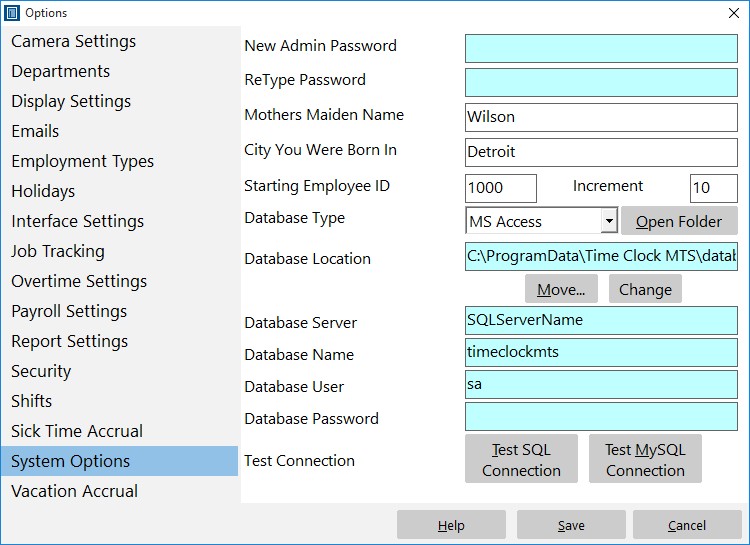
The System Options Screen
It’s a common misconception that the only way to reset your Time Clock MTS password is to use the File->Reset Administrator Password menu. But this menu is for resetting forgotten administrator passwords. If you still know your password and just want to set it to something different here’s what to do.
- Log into the Time Clock MTS Administrator program as the administrator using your password.
- Go to the Tools->Options Menu.
- Go to the System Options Screen (shown in the image above).
- Enter your new password into the Admin Password field.
- Confirm your new password by typing it again into the Re-Type Password field.
- Save the password by clicking the Save button.
Once you’ve done that your Time Clock MTS administrator password will be set to the new value and you’ll have to use the new password to log into Time Clock MTS as the administrator.
by Mark Nemtsas | Sep 25, 2010 | News
You’re probably aware that things have been a bit quiet lately on the Time Clock MTS development front. There’s a couple of reasons for this, firstly we’ve been concentrating pretty hard on our web based time clock system, Online Time Clock MTS. The second reason is that we’re deep into the planning phase of Version 3 of Time Clock MTS. We’ve been taking requests from users concerning what they’d like to see in the new major release and we’re still interested in hearing from anyone else. So, if you’ve got a suggestion for something you’d like changed or added to Time Clock MTS please let us know. We’ll take all ideas and suggestions under consideration.
by kathryn@timeclockmts.com | Sep 25, 2010 | New Releases, News
I’ve just released a very minor update of Time Clock MTS taking the software to version 2.5.11. There’s just one fix in the update that corrects a rounding bug in reports that display times in the hh:mm:ss format. There were some circumstances where (for example) 1 hour and 8 minutes (01:08:00) could be displayed as 1 hour, 7 minutes and 60 seconds (01:07:60), which of course is exactly the same amount of time. Just a formatting problem and one that didn’t affect any calculations, this has been resolved.
