« April 2010 | Main | August 2010 »

May 28, 2010

Online Time Clock MTS BETA Test Period Opens

I'm happy to announce that Online Time Clock MTS is now available for testing during a completely free BETA test period. This will allow you to use Online Time Clock MTS completely free of charge while we develop and test it prior to it going completely commercial in a few months. We've tried to bring the same user friendly interface and features that you, the Time Clock MTS user have helped us develop over the years to the online version of Time Clock MTS.

Time Clock MTS and Online Time Clock MTS are not compatible at the moment, but the plan is that we'll develop a data export tool to allow you to send your Time Clock MTS data to the online version. Once that happens you'll be able to transition to Online Time Clock MTS and use that instead of Time Clock MTS (you won't be able to use both at the same time with the same data).

If you're interested in learning more about the new online application then head on over and read about Online Time Clock MTS or just dive straight in and sign up for a free online time clock account and start using it.

Posted by By Mark Nemtsas at 1:45 PM | Comments (0)


May 12, 2010

Time Clock Reviews

We're lucky enough to have had Time Clock MTS reviewed a few times by independent reviewers on various sites around the internet. I wouldn't say that any of these reviews has been fully comprehensive (it's hard to test out the full capabilities of Time Clock MTS in a short period) but these time clock reviews are useful if you're considering the purchase of a time clock program. Here's a list of the time clock reviews including Time Clock MTS that we're aware of.

If you're aware of any more reviews of Time Clock MTS about the place please let me know. If you want to know what real world users have got to say about Time Clock MTS you could take a look at our user testimonials page or take a look at a recent blog entry with a user talking about his real world use of Time Clock MTS in a machine shop.

Posted by By Mark Nemtsas at 2:02 PM | Comments (0)


May 8, 2010

Time and Attendance Clock

Time Clock MTS Screenshot, Biometric Time Clock Software Screenshot
The Time Clock MTS Keypad Interface

We've spoken many times here about the benefits of using an employee time and attendance clock but it's always worth re-emphasizing the benefits an employer is likely to see by the adoption of a computerized time and attendance clock. So, here's my top 5 reasons why you should be looking to move your current mechanical or manual time and attendance system to a computerized one like Time Clock MTS.

  1. Recording Timely and Accurate Data : Your core business isn't collecting time and attendance data, your business is looking after your patients, serving your customers, making meals, fixing cars, manufacturing valves, or whatever your business does. Collecting employee attendance data should be quick, painless, and take a minimal amount of time to ensure that your employees actually do it.
  2. Reducing or Eliminating Time Clock Fraud and Buddy Punching : It's a fact of life that there are people around who will try to crib time on their time sheets or have friends clock in or out for them at the work place. A good Time and Attendance Clock like Time Clock MTS should allow you to go a very long way to minimizing or eliminating this costly practice.
  3. Reducing Administrative Overheads : A good Time and Attendance Clock should record accurate data to a central database and then provide this data to your payroll administrators for instant and accurate reporting. Manual tallying of time cards, the wasted time this entails, and the inevitable payroll errors that result should be completely eliminated. Your staff should be able to spend a minimal amount of time processing payroll and be able to focus on what makes your business profit.
  4. Low On-Going Cost of Ownership : Even if your chosen time clock system produces payroll reports of great accuracy it is useless if it requires hours of training for each new employee you take on board or hours of tweaking by administrators to get it to work the way you want. Your Time and Attendance Clock system should be easy to configure and stunningly easy to clock in and out of. This tool should pay for itself in savings rather than be a continual administrative and training expense.
  5. It Must Grow With Your Business : All businesses go through changes and your chosen Time and Attendance Clock must be able to grow as you do. Time Clock MTS can be used and administered on just one PC for a very small business and can scale upwards to be used on dozens of work stations as your business grows. There's no need to be changing systems as more employees come on-board.

We're pretty confident here that Time Clock MTS can deliver strong benefits in all these areas. Try heading over to the Time Clock MTS Quick Tour to learn more about it or go to the Time Clock MTS Downloads page to download and trial the software for 30 days.

Posted by By Mark Nemtsas at 10:16 AM | Comments (0)


Biometric Time Clock Software

Time Clock MTS Screenshot, Biometric Time Clock Software Screenshot
Enrolling an Employee Fingerprint in Time Clock MTS

There's no doubting that buddy punching and time clock fraud are an on-going problem in most work places and as an employer you must either accept the on-going problems this causes or do your best to prevent it. Biometric Time Clock Software is the current tool of choice in workplaces where the employer has decided to take a stand against poor time and attendance data collection. There are a number of biometric methods available to Biometric Time Clock Software including facial recognition and iris scanning but by the far the most popular is fingerprint recognition. Fingerprint scanning is a proven technology, the hardware is quite affordable, and the software to make it work is low cost and very reliable.

Time Clock MTS has teamed up with the very well known biometric security company, Digital Persona, and can offer a comprehensive Biometric Time Clock Software. Not only does this offer you, the employer, the best chance of eliminating time clock fraud, it also offers it at no extra cost over the normal version of Time Clock MTS. Just buy the correct DigitalPersona finger scanner (the 4000 and 4500 models are supported) and standard version Time Clock MTS will work with them without you needing to purchase anything else. It really doesn't get any easier than that! If you'd like to see how Time Clock MTS works with the DigitalPersona fingerprint scanners then try taking a look at our biometric time clock software demonstration video. If you need more information then you should head over to the biometric Time Clock MTS page.

Posted by By Mark Nemtsas at 9:52 AM | Comments (0)


May 7, 2010

Employee Clock-In Software

Time Clock MTS Screenshot, Job Tracking Time Clock Software Screenshot
Time Clock MTS Employee List with Department Folders

If you're considering purchasing and using employee clock-in software then you need to ask yourself the following questions:

  • Is it Simple to Use?: It doesn't matter how you paint it, employee time tracking and timesheets are not fun, they are necessary but not something anyone actually wants to do. And given an opportunity your employees will use any excuse avoid clocking in or out as they must. So any employee clock-in software you choose must be extremely simple to use from the employee's point of view or you'll have a constant battle with them to even collect their attendance data.
  • Does it Fit Your Business?: The employee time clock software you choose must have sufficient flexibility to suit your business and the way you work. It should fit seamlessly within your organization and go about it's work with a minimal amount of fuss. To achieve this it must provide flexibility in terms of reporting, vacation and sick time accruals, overtime calculations, and be secure.
  • Is it Timely and Accurate?: A key failing of manual or paper based employee clock in systems is that the information is often neither timely nor accurate. Employees are prone to making poor estimations of the time of their arrival at work and manually processing and tallying paper timesheets is both time consuming and prone to error. The employee clock in software you choose must collect attendance data using an accurate clock, record it immediately to a central database and that data must be available at all times for accurate reporting.

Time Clock MTS is used by more than 10,000 companies and we have spent many hundreds of hours of work making it easy to use for employees and managers. We have listened to the users of the software to provide a set of features that can be adapted to almost any business within the United States and around the world. Finally the software has a number of interface options (such as a biometric finger scanner, magnetic cards, and bar codes) to make data collection fast, painless and entirely accurate.

Posted by By Mark Nemtsas at 12:23 PM | Comments (0)


Using Job Tracking to Track Paid Breaks

Time Clock MTS Screenshot, Job Tracking Time Clock Software Screenshot
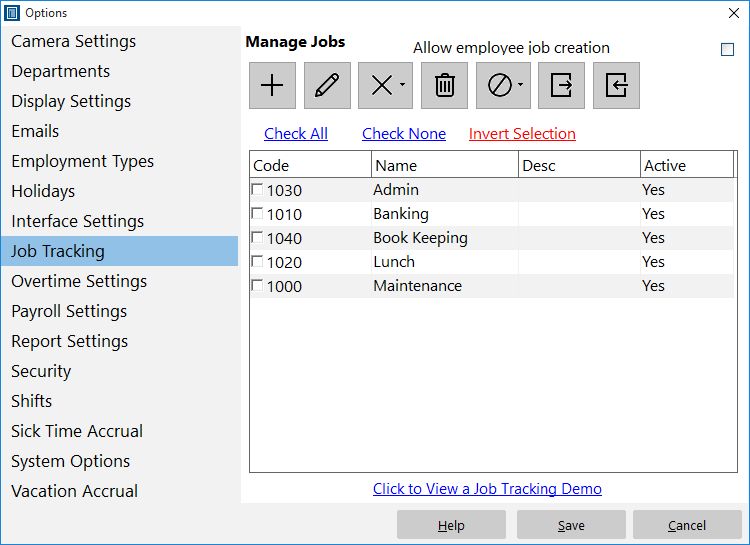
Defining Time Clock MTS Jobs

A common question I get asked is "How do I track paid breaks for my employees?". I've never really had a good answer to this question until earlier this week in a flash of inspiration (yes I do have them very occasionally) I realized that anyone could easily make use of the Time Clock MTS Job Tracking features to easily track paid breaks. Here's how I'd set it up:

  1. Go to the Job Tracking screen and define a job for each paid break type that you want to track. This might be 'lunch break' or 'coffee break' or whatever suits your needs.
  2. Go to the Employee Information screen and set the Job Tracking setting for each employee to "Optional". When this is set, employees will be shown the "Enter Job Code" screen when they clock in or out but they won't actually have to enter a code.
  3. When employees come to work, just have them clock in as normal without entering a job code. When they take a paid break, have them clock out and switch jobs to one of your paid break codes which you defined in step 1 above. When they return from a paid break, have them switch jobs again but not enter a job code (they are back on normal time).
  4. You can then use Job Time Report to monitor how much time your employees are spending on their paid breaks and ensure there is no time clock fraud occurring.

I hope you find that little tip helpful, it will certainly give employers much tighter monitoring on what their employees are up to with almost no extra administrative overhead being added to the business!

Posted by By Mark Nemtsas at 11:57 AM | Comments (0)


Freeware Time Clock Software

Time Clock MTS Screenshot, Time Clock Software Screenshot

Time Clock MTS is a commercial software program with a free 30 day trial period, however, under certain usage conditions it can be used as freeware time clock software. That's right you can use it for free, forever, if you just use it under the following restrictions:

  1. You can only track 3 or fewer employees in the Time Clock MTS Database. This allows startup or micro businesses access to truly powerful freeware time clock software free of charge until they grow to a point where they can afford to purchase the software.
  2. You can only install and use Time Clock MTS on one computer, this means you can't use the client version of the software on one PC and run your reports and configure the software on another. You'll have to use the administrative software on one PC to manage your employees AND record your time and attendance data.

If you're interested in trying some freeware time clock software then head over to our download page to download Time Clock MTS. Once you've done that you can try out the full version of the software for 30 days and once that period is over Time Clock MTS will revert to freeware mode and you can keep using it without interruption. Of course you'll have to have 3 or less employees in your database and not be using the client software for this to happen!

Posted by By Mark Nemtsas at 11:41 AM | Comments (0)


Employee Time Clock Software

Time Clock MTS Screenshot

Last week I was asked what the key selling point of Time Clock MTS was? I thought for a while before saying the following...."the software is designed primarily to be extremely simple to use for employees ensuring that the quality of time and attendance data collected is as high as possible and the on-going cost of ownership to the company is as low as possible". Time Clock MTS is in fact, employee time clock software. Much time has been spent streamlining the process that employees go through to clock in or out of Time Clock MTS and in it's most simple form they can do so with just two mouse clicks. There's a little more work if you want your employees to enter a PIN number or password when they clock in or if you want them to use their fingerprint to clock in or out but even then you're talking about less than 10 seconds work.

In my experience, any employee time clock software that makes the employee's task of clock in or out difficult or time consuming will result in one or many of the following happening:

  • The failure to use the employee time clock software all together or only sporadically, meaning employee attendance information will neither be timely or accurate.
  • Log jams at the start of shifts as employees queue to clock in or out meaning time is lost on non income generating administrative tasks.
  • An on-going and recurring training expense for new hires as they need to be trained in the use of a clunky employee time clock system.

With the time we've spent refining and optimizing Time Clock MTS to be the easiest to use employee time clock software on the market we've addressed all of these three points. We're so confident of this that in most cases companies will pay for their initial purchase of Time Clock MTS within just a couple of months and have a system that allows them to get on with the work that generates their profits. If you're interested in trying out Time Clock MTS free of charge for 30 days then head over to our download page to download employee time clock software.

Posted by By Mark Nemtsas at 10:52 AM | Comments (0)