by kathryn@timeclockmts.com | Nov 21, 2009 | New Releases, News
A very minor release today containing a couple of fixes. The first fix solved a problem where too many rows were being displayed on the employee list when there were departments defined with no employees assigned to them. This only affected users who had the show department folders on employee list feature turned on.
The second fix has loosened up some of the licensing checks in the software to stop a number of false licensing failures that users have been experiencing. Hopefully these changes will prevent properly licensed users from being inconvenienced any further.
by Mark Nemtsas | Nov 17, 2009 | News, User Testimonials
Another user of Time Clock MTS has emailed me with details of how they are using the software. While their application is slightly more conventional that the other applications I’ve discussed to date (timing racing cars and refitting trucks) it is still novel enough to be worth discussing. You can find the (slightly edited) email from the user in question below explaining their application.
A little more information… What I said was true, we don’t care about the payroll functions and are only concerned with the time clock feature, but we actually are billing for the time. Let me give you a little more information about our organization, what we do, and what our usage entails.
We are a non-profit organization dealing with people suffering from some sort of illness. We have many different programs to help these people feel confident with themselves, train them in basic job skills, and help them to obtain a job, build a resume, and eventually, lead them to independence.
As I said, we are non-profit, so a lot of our funding comes through grants and special programs. In the near future, our billing is changing and our services will be billed through a government program. When this happens, we need to track hours for all of the people that attend what we call our Clubhouse in order to bill for them.
Time Clock MTS is being used in this company at the two entrances to their ‘clubhouse’. They have purchased a single client license (US$98 at the time of writing this article) and have a client installation at one door and the admin installation at the other. Let’s see what the main benefits from using Time Clock MTS in this situation have been.
Currently, under the grant we are being funded through, we are tracking people as they come and go with a paper sign in sheet. When we begin billing through the government program, we would prefer a more reliable, electronic means that would also provide us with a reporting feature. Unfortunately, because our main software package doesn’t allow us to import data, we then need to key in the hours tracked through your software and get them into our system for billing.
This isn’t vastly different than what we are doing now, but it helps us on three fronts. First, we aren’t currently tracking time – just whether a person signs in or not. Second, with the reports generated from your system, we are able to eliminate the issues of trying to decipher various handwriting styles. Third, as an added bonus, because we can assign a pin number to each person, it will speed up our data entry. In our billing system, we can look up a person by name, but it is faster to look them up by their 4 digit ID number. By assigning the 4 digit ID number as a pin in your software, it makes keying in the information faster and more efficient, even though we are actually capturing additional data.
So Time Clock MTS is providing the organization in question with a much more reliable and efficient way of collecting their club’s attendance data. This data can then be imported easily into their existing club accounting system for provision to the government for appropriate reimbursement. At the moment we are working with the organization to define a report suitable for direct export from Time Clock MTS into their other computer systems to eliminate the last source of errors and double data entry. All of these gains are realized without using a large portion of the software (payroll, vacation accruals, sick time, holidays and many other things). Time Clock MTS is simple enough to use to just allow it to be used as a simple time tracker without being forced to use the more advanced functionality the software offers.
by kathryn@timeclockmts.com | Nov 17, 2009 | New Releases, News
Version 2.5.0 of Time Clock MTS was released today. While there isn’t a large number of changes from the last release I feel that the number of new features that have been added since 2.4.0 and the large improvements in reliability justify the minor version update. Changes from the last release include:
- Added department folder view to the employee list interface along with a new setting to turn this on. More on this in a subsequent blog entry.
- Added mouseover highlights to employees on the employee list.
- A few tweaks to the way the employee list interface works to ensure it is updated correctly when editing employees or changing program settings.
- A default report is now selected on the Payroll Reports screen when first running the software.
by Mark Nemtsas | Nov 17, 2009 | How To, New Features, Using the Software
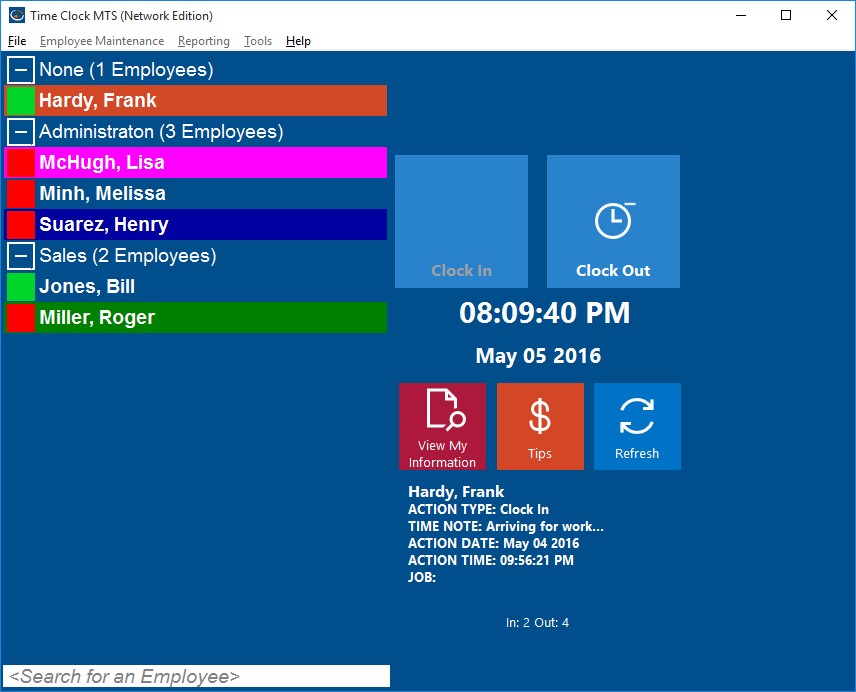
Employee List with Department Folders
Version 2.5.0 of Time Clock MTS included an interesting new feature that allows you to split the Employee List Interface into departmental folders. This can be extremely useful if you have a lot of employees or if you have separate Time Clock MTS client stations located around your business on a department by department basis. In the screenshot above you can see how the employees are split up by department and that the department groups can be expanded or collapsed as required. Time Clock MTS will remember which departments you have expanded or collapsed when you restart the software so you can setup (for example) a single Time Clock MTS Client to just display the employees from a single department.
Turning on the department folder view of Time Clock MTS is very easy. Just login as the Administrator and then go to the Tools->Options->Interface Settings page. When you’re on this screen check the Dept. Folders on Employee List checkbox and then click the Save button to commit the changes. When you return to the employee list you should see that it is now split up by departments. Of course you’ll need to have some departments defined and have assigned your employees to the departments.
by kathryn@timeclockmts.com | Nov 13, 2009 | New Releases, News
I released a new version of Time Clock MTS today that contained a number of minor changes designed to either fix or enable me to fix some persistent small bugs that certain users have been reporting. Changes made are detailed below.
- The search for an employee label would only update to a new setting after re-starting the software. This is now fixed.
- Debugging code added to try to determine reason for invalid procedure call error that one person is getting.
- Fixed length of password reminder question answers text fields.
- Added lots of debugging code to payroll summary report to try to figure out why some people cannot see some reports.
- Fixed up a couple of reports that were still showing deleted employees as delegates.
- Changed the popup message when adding an employee with an existing employee id / badge number. You cannot add an employee whose badge number is the same as a deleted employee.
- Added catches for lost database connections in various parts of the software.
