
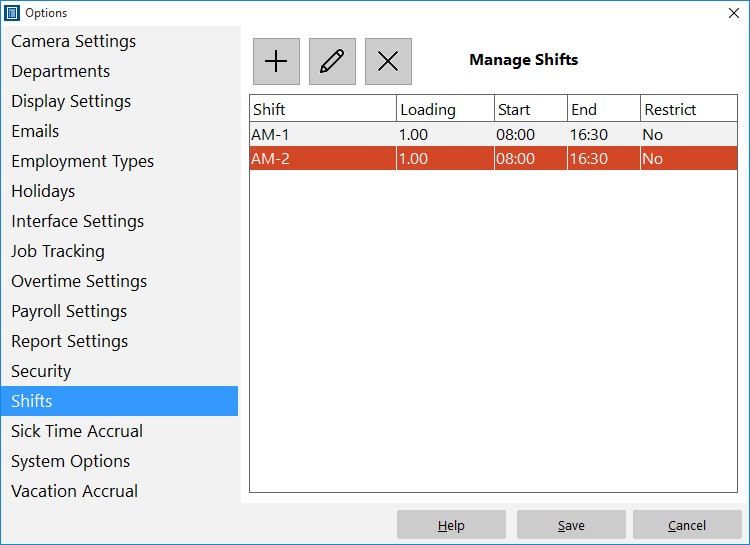
Add, edit, and delete shifts.
Time Clock MTS has a system built in to prevent employees punching in too early. To set this up you must be logged in as the time clock administrator and then navigate to the Tools->Options->Shifts page (see image above and the shifts help topic). Click the new shift  button and you’ll be taken to the Add/Edit shift screen as shown below.
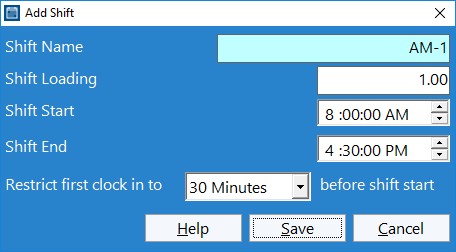
Shifts can be used to control when employees can punch in.
At the bottom of this screen you can see the new setting Restrict First Clock in to XX before shift. All you need to do is make a selection of None, 1 minute, 6 minutes, 15 minutes, and 30 minutes from the drop down. Obviously if you select none then there will be no restriction on when an employee can clock in. However, if you select one of the time limits then any employee assigned to that particular shift will be prevented from clock in any earlier that the chosen limit before the shift start time. So, for example, in the shift above, any employee will not be able to clock in any earlier than 7.30AM.
The clock in must be the first one of the day for the restriction to take effect.
