
Resetting the Time Clock MTS Administrator Password
Resetting a Forgotten Password
One of the most common questions we get is from users who have lost track of what their Time Clock MTS administrator password is. This could be because they’ve not used the software for a long time, because of a change of staff, or perhaps simply because they’ve forgotten what the password was. Previously we had to reset the password for users and this meant they had to email their Time Clock MTS database to us. With the release of Version 2.1.8 of Time Clock MTS this will (hopefully) be largely a thing of the past.
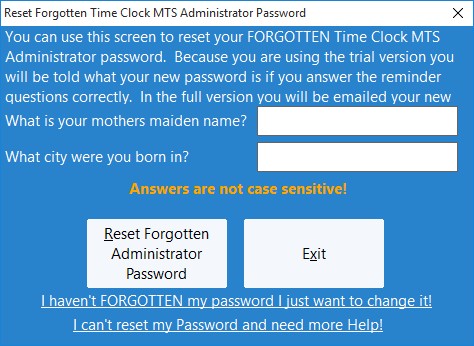
Two password reminder questions have been added to the software which allow you to reset the password yourself. These reminder questions are set either when you first install the administrator software or from the Tools->Options->System Options screen. When you need to reset the password you can do so in the administrator software on the File->Reset Administrator Password menu. You’ll be shown the screen above.
If you answer both questions correctly (answers are NOT case-sensitive) then you’ll be able to reset the administrator password. How the password is reset depends on how your copy of Time Clock MTS is registered.
- You are operating in trial mode: when the password is reset Time Clock MTS contacts our web server. The web server sends a new password back to the software and you’ll be told directly what the new password is.
- You have purchased the software BUT have not received your registration key yet: when the password is reset Time Clock MTS contacts our web server, the web server sends a new password back to the software and you’ll be told directly what the new password is.
- You are a registered Time Clock MTS user: if you have a current support contract (you’ve purchased in the last 12 months or renewed support in the last 12 months) when the password is reset Time Clock MTS contacts our web server. The web server sends an email to the email address used to make the original purchase containing your new password. This is a much more secure method and one of the advantages of purchasing the software. If you do not have a current support contract you’ll need to renew BEFORE you can reset your password online.
- You are using the FREE Edition: you cannot reset your password online, you’ll have to contact us for help.
The one thing to realize with resetting the password is that you must have answered the password reminder questions to be able to use this new function. If you haven’t answered them then you’re stuck with resetting your administrator password the old way and you’re going to need to email us your time clock data file. If you need instructions on how to do this read this support topic.
Time Clock MTS
The Easy Time Recording System
Time Clock MTS
The easy to use time recording software with a fully functional 30 day trial.
Buy Time Clock MTS
Purchase a registration key from our online shop. Only buy once, no monthly fees.
