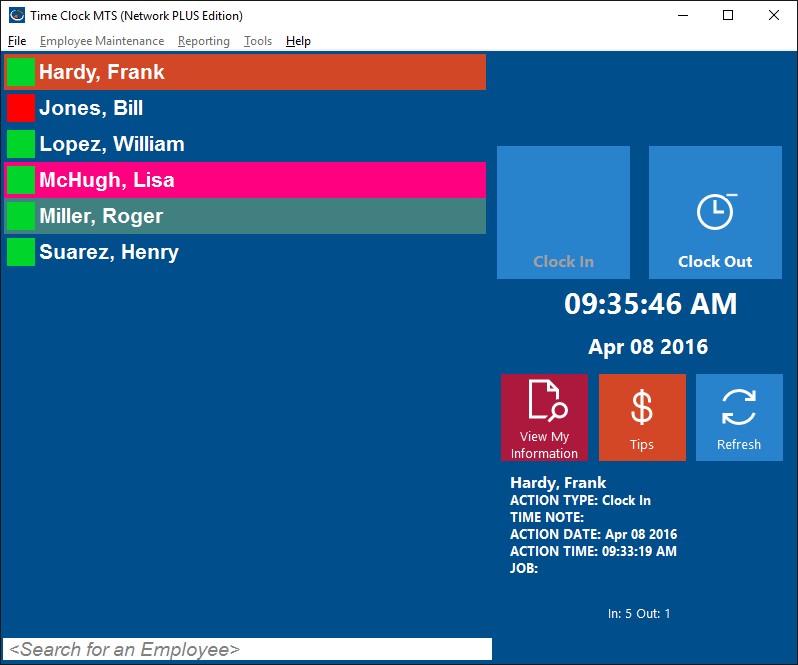
The employee list interface of Time Clock MTS is the default setting. To change or return to this option use the Interface Settings screem via the Tools->Options Menu. The other interface option is the keypad interface mode of Time Clock MTS. To use the employee list interface employees simply select their name from the employee list on the left and then depending on their last action click the Clock In or Clock Out button. A successful time punch (either in or out) is indicated by the Clock In or Clock Out buttons being highlighted in green. A failed time punch will be indicated by the buttons being highlighted in red.
The employee list is sorted alphabetically and the green and red icons next to each employees name allow you to see at a glance who is clocked in and who is not. Employees with a green icon are clocked in, with a red icon are not clocked in, and those with a gray icon have had their accounts deactivated by the administrator. Employees that are currently out on sick time or vacation time are indicated by a purple icon. Employees who are currently working on a job will have the job icon on top of their usual green icon.
The last action area shows the details of the last action of the selected employee on the employee list. The View Employee Information button allows employees to view their punchcard reports and place time off requests (if allowed by the administrator).